


 Garantía de entrega






SKU/Artículo: AMZ-B0D22WL8DD
Xiiaozet
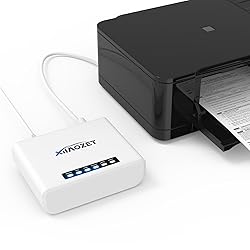
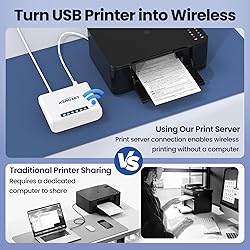
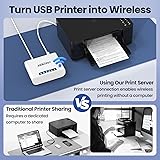
Xiiaozet Wireless Print Server, Share a Printer to Multiple Computer with 1 Port USB2.0 Wide Compatibility Convert Printer to Wirelesss Support Ethernet WiFi Connect Network LK100W.
Capacity:
1 USB Port
Detalles del producto
Disponibilidad:
En stock
En stock
Peso con empaque:
0.42 kg
0.42 kg
Devolución:
Sí
Sí
Condición
Nuevo
Nuevo
Producto de:
Amazon
Amazon
Viaja desde
USA
USA
Sobre este producto
- Product Included 1x USB Print Server 1x Power Adapter 1x USB Cable 1x Ethernet Cable
U$S 122,64
49% OFF
U$S 62,89
IMPORTÁ FACIL
Comprando este producto podrás descontar el IVA con tu número de RUT
U$S 122,64
49% OFF
U$S 62,89
 Llega en 5 a 11 días hábiles
con envío
 Tienes garantía de entrega
Conoce más detalles
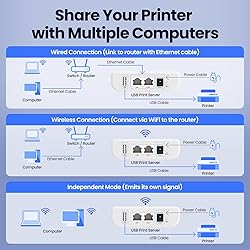
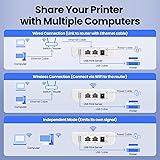
【WIRELESS PRINTING & SHARING】 Convert your old USB printer into a high-performance network printer without messy cables. Our wireless print server allows multiple computers on the same LAN to share one printer simultaneously, enabling automatic queue printing to boost productivity. Access print server efficiently via its assigned IP address from any corner of your office or home. 【DUAL-PORT WIRED BRIDGE & SWITCH】 Featuring two 10/100Mbps Ethernet ports, our server supports a "daisy-chain" setup: connect one port to your network and the other directly to your computer. It acts as a mini-switch to save a router socket and keep your desk organized. NOTE: The second port provides internet to your PC ONLY in wired mode; it does NOT support wireless-to-ethernet bridging. 【UNIVERSAL COMPATIBILITY】 Supports 95% of USB printers, including Inkjet, Laser, Thermal Label, and Dot Matrix models using RAW/IPP protocols. Compatible with major brands like HP, Brother, and Canon. IMPORTANT: Not compatible with dye-sublimation printers (e.g., DNP), Roland BN series, or Canon LBP CAPT series printers. Mobile printing and AirPrint are not supported. 【STABLE DUAL CONNECTIVITY】 Features both 2.4GHz WiFi (802.11b/g/n) and a 10/100Mbps Ethernet port for flexible placement anywhere in your home or office. Equipped with a high-performance processor and smart indicator lights for real-time status monitoring and fast data processing. 【FLEXIBLE & EASY SETUP】 Use our Windows Quick Installation Tool for a streamlined 2-step setup: network config and printer addition. For advanced users or Mac/Linux, we fully support manual configuration via web-based management and standard TCP/IP port settings (IP/Hostname.local). Detailed manuals and video tutorials are provided for a hassle-free experience.
Compra protegida
Disfruta de una experiencia de compra segura y confiable
![]() Garantía de entrega
Garantía de entrega
Con Tiendamia todas tus compras cuentan con Garantía de Entrega o devolución total de tu dinero.
Compras 100% seguras y garantizadas, para que pidas lo que soñás y lo recibas del mundo a tu puerta.
Saber más.
Tarjetas prepagas, debito, y credito
Paga hasta en 12 cuotas sin interés con tarjetas de crédito.

Visa

Mastercard

American Express

Dinners

Discover

Lider

Midinero

OCA

OCA Blue

Tarjeta PREX
Pagos a través de PayPal
Paga en dólares con Tarjetas internacionales a través de PayPal.

PayPal

