







 Garantía de entrega









SKU/Artículo: AMZ-B0F2HPDXTD
iDPRT
iDPRT Portable Printer Wireless for Travel - Bluetooth Mobile Printer Support for 8.5"x11" US Letter, Inkless Compatible with iOS, Android, Laptop for Office, Car and Home (pro, White)
Color:
White
Style:
pro
Detalles del producto
Disponibilidad:
En stock
En stock
Peso con empaque:
0.93 kg
0.93 kg
Devolución:
Sí
Sí
Condición
Nuevo
Nuevo
Producto de:
Amazon
Amazon
Viaja desde
USA
USA
Sobre este producto
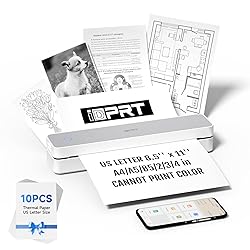
- Seamless Multiple Connectivity: This mobile printer can easily connect with smart devices (iOS & Android systems) via Bluetooth. Also can connect via the included USB cable when using a computer Quick Start Guide Printing: Phone - Turn on the printer, scan the QR Code to download "Hereprint" App and connect the printer via APP (Keep Bluetooth open). PC - Install the drivers and use the usb cable to connect the PC and printer, print your document via printer "iDPRT MT610 Pro". Ink-Free and Effective Printing: Upgraded HD printing technology and specialized thermal paper for excellent printing quality, there is no need to frequently replace ink, toner, or ribbons anymore. What You Get: iDPRT MT610 Pro Wireless Printer, USB Cable, Product Manual, Free 10 Sheets Thermal Paper. Please refer to the product manual before using our printer
U$S 90,56
49% OFF
U$S 46,44
IMPORTÁ FACIL
Comprando este producto podrás descontar el IVA con tu número de RUT
U$S 90,56
49% OFF
U$S 46,44
 Llega en 5 a 11 días hábiles
con envío
 Tienes garantía de entrega
Conoce más detalles
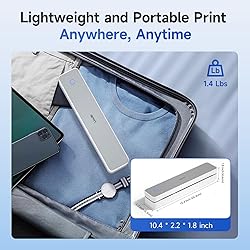
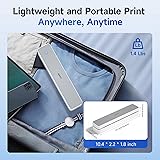
Ultra-Portable Design - The iDPRT portable thermal printer features a streamlined design, compact size, weighing only 1.4 pounds and measuring just 10.4 x 2.2 x 1.8 inches, making it easy to carry in your backpack, tote bag or briefcase, perfect for long commute times. Our portable document printer is a solid choice for anyone needing a reliable, portable printing solution. Great concept for on-go printing from anywhere needed, like if traveling for photos, work, business, office, home, car, or university.It great for business travelers, students, and remote workers. Inkless Portable Printer - Bluetooth printers use thermal technology - no ink, toner or ribbons are required. This not only eliminates the hassle of ink clogs and cleaning, but also makes it an eco-friendly choice. Bluetooth printers offer an affordable solution for everyday printing needs, allowing you to easily print documents such as recipes, forms, letters, homework, study materials and travel documents by simply selecting the document you want to print directly on your mobile phone. Universal Compatibility & Wide Printing Range - The thermal inkless printer is compatible with a wide range of OS, including iOS (for iPhone & iPad), Android, Windows, and Mac, OS.It supports a variety of thermal paper sizes, such as 8.5"x11" US letter and legal paper, A4, A5, and 4" - wide thermal paper. (Note: Portable printer is a thermal printer and only supports thermal paper, not support regular copy paper.) Easy To Use - The bluetooth thermal printer enables Bluetooth wireless printing via the mobile phone app "HerePrint". The printer can also connect to laptops and desktops via USB. When using a computer, just connect the printer via USB and then install the driver. (Note: Download the driver from iDPRT website on your computers.) Crisp Printing Quality & Long Battery Life - The iDPRT Bluetooth thermal printer, High-definition printing accuracy ensures that barcodes, text and simple graphics are clear and sharp, taking into account both printing efficiency and professional-level recognition requirements, and avoiding blurring problems caused by low resolution. The wireless printer comes with a built-in 2000mAh battery for continuous printing of up to 4 hours and 360 sheets on a single charge. The portable printer is suitable for home, school, office and vehicles.(Note:Thermal mobile printers are not suitable for complex image printing, and only support black and white printing.) How to Print on Phones - (1) Download the "HerePrint" app from the App Store or Google Play. (2) Turn on the inkless portable printer. (3) Enable Bluetooth on your phone and click the ‘+’ button in the app to complete the printer connection. Then select the file type to start printing. How to Print on Computers - (1) Power on the printer. (2) Connect the printer to your computer via USB. (3) Download the corresponding driver for the iDPRT MT610 Pro. (4) Select "iDPRT MT610 Pro" as your printer to start printing. Tips: Before downloading the driver, power on the printer and connect the printer to your computer via USB. What You Get: iDPRT MT610 Pro Wireless Printer, USB Cable, Product Manual, Free 10 Sheets Thermal Paper. Please refer to the product manual before using our printer.
Compra protegida
Disfruta de una experiencia de compra segura y confiable
![]() Garantía de entrega
Garantía de entrega
Con Tiendamia todas tus compras cuentan con Garantía de Entrega o devolución total de tu dinero.
Compras 100% seguras y garantizadas, para que pidas lo que soñás y lo recibas del mundo a tu puerta.
Saber más.
Tarjetas prepagas, debito, y credito
Paga hasta en 12 cuotas sin interés con tarjetas de crédito.

Visa

Mastercard

American Express

Dinners

Discover

Lider

Midinero

OCA

OCA Blue

Tarjeta PREX
Pagos a través de PayPal
Paga en dólares con Tarjetas internacionales a través de PayPal.

PayPal

