


 Garantía de entrega






SKU/Artículo: AMZ-B0GFT9PB92
Jaclech
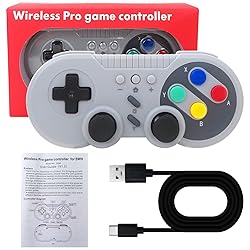
Jaclech Retro Wireless Controller for Switch and for PC, Featuring Motion Control Technology, Dual Vibration, Turbo Mode, Wake-Up Function - Gray
Detalles del producto
Disponibilidad:
En stock
En stock
Peso con empaque:
1.54 kg
1.54 kg
Devolución:
Sí
Sí
Condición
Nuevo
Nuevo
Producto de:
Amazon
Amazon
Viaja desde
USA
USA
Sobre este producto
- Retro Wireless Controller for Switch and for PC, Featuring Motion Control Technology, Dual Vibration, Turbo Mode, Wake-Up Function - Gray Wireless Controller for Nintendo Switch This wireless gamepad compatible with switch console and also supports for Windows PC. Adopt new wireless connection technology, strong anti-interference ability, more stable connection. Built-in large capacity battery for long time use. Support wake-up function, built-in gyroscope to provide motion control and built-in dual motor to provide dual vibration function. You can use the Turbo and screen-capture buttons to implement corresponding functions. HOW TO CONNECT? First Connection: 1.Select the [ Controller ] Menu. 2.Select the [ Change Grip/Order ] Menu. 3.Press and Hold the [ HOME ] key 4 seconds on the [ Change Grip/Order ] Page and 4 indicators blinks fast.(Enter the search configuration.) 4.After the connection is successful,the LED lights indicate the corresponding game player. Connect The Controller To The Console Again: Switch Console In the Open state, press the [ HOME] button to start the controller, and the gamepad will be automatically connected to the console. At the same time also supports the [ HOME ] button to wake up the console, wired to connect the computer and other functions, please see the manual working.
U$S 40,59
31% OFF
U$S 27,99
IMPORTÁ FACIL
Comprando este producto podrás descontar el IVA con tu número de RUT
U$S 40,59
31% OFF
U$S 27,99
 Llega en 11 a 15 días hábiles
con envío
 Tienes garantía de entrega
Conoce más detalles
Retro Wireless Controller for Switch and for PC, Featuring Motion Control Technology, Dual Vibration, Turbo Mode, Wake-Up Function - Gray This wireless gamepad compatible with switch console and also supports for Windows PC. Adopt new wireless connection technology, strong anti-interference ability, more stable connection. Support wake-up function, built-in gyroscope to provide motion control and built-in dual motor to provide dual vibration function. You can use the Turbo and screen-capture buttons to implement corresponding functions.
Compra protegida
Disfruta de una experiencia de compra segura y confiable
![]() Garantía de entrega
Garantía de entrega
Con Tiendamia todas tus compras cuentan con Garantía de Entrega o devolución total de tu dinero.
Compras 100% seguras y garantizadas, para que pidas lo que soñás y lo recibas del mundo a tu puerta.
Saber más.
Tarjetas prepagas, debito, y credito
Paga hasta en 12 cuotas sin interés con tarjetas de crédito.

Visa

Mastercard

American Express

Dinners

Discover

Lider

Midinero

OCA

OCA Blue

Tarjeta PREX
Pagos a través de PayPal
Paga en dólares con Tarjetas internacionales a través de PayPal.

PayPal

