


 Esta súper oferta termina en


 Garantía de entrega






SKU/Artículo: AMZ-B0DRZPKZVD
Thafikzi
VR Remote Controller for Phones Compatible with Oculus/iOS/Android, Wireless Bluetooth Joystick Remote for iPhone/iPad/Flip E-Book/PPT/Nook Page/to Control Music, Video, Games, Selfie (Upgraded)
Detalles del producto
Disponibilidad:
En stock
En stock
Peso con empaque:
0.86 kg
0.86 kg
Devolución:
No
No
Condición
Nuevo
Nuevo
Producto de:
Amazon
Amazon
Viaja desde
USA
USA
Sobre este producto
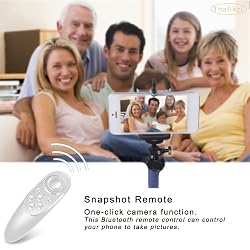
- Product Description Steps for usage: 1. Put your AAA batteries on the Bluetooth remote controller, then turn on the controller power according to the mode you need. 2. Turn on Bluetooth on your phone or tablet. 3. After the Bluetooth pairing succeeds, the indicator light goes out, and it can be used normally. 4. According to the manual, switch to the function mode you need. NOTE: Due to the multiple functional modes of this universal wireless controller, its operation is slightly complex. If you have any questions, please feel free to contact us, and we will be very happy to help you solve the problem. Connection method: Bluetooth Supported operating system: IOS 13 or above, Android Remote control distance: Not more than 390 inches. Controller size: 4.7 * 1.8 * 1.4 inches Package size: 5 * 1.9 * 1.5 inches You will get: 1 * Bluetooth remote controller 1 * User Manual (Includes English version)
U$S 18,99
IMPORTÁ FACIL
Comprando este producto podrás descontar el IVA con tu número de RUT
★ AHORA EN FRANQUICIA
U$S 18,99
 Llega en 25 o más días hábiles
con envío
 Tienes garantía de entrega
Este producto viaja
de USA ![]() a tus manos en
a tus manos en
![]()
 a tus manos en

Conoce más detalles
❤【Multifunctional】 This remote control controls mobile phones, VR, tablets or other devices through Bluetooth, and has a variety of functional modes. Such as music mode, video mode, game mode, selfie mode, mouse mode. ❤【Wide compatibility】 This Bluetooth remote controller and gamepad is compatible with iOS, Android, Oculus and Windows devices, including Smart Phones, MID, Tablets, Desktops, TV box etc. Compatible with iPhone/iPad/VR/Android phones/tablets/Samsung phones/Sony phones etc. The functions of the joystick remote control in IOS and Android systems are slightly different. ❤【Act as a selfie shutter】 Press and hold the [ B + Power Button ] for 5 seconds, and connect Bluetooth "MOCUTE-052Fe-AUTO" to enter the automatic mode. At this time, for iOS devices, press A to take pictures. For Android devices: For Samsung devices: press OK key to shutter, Volume key to adjust focus; For other Android devices: please enter camera setup first, set volume key to shutter or download camera software. ❤【XINPUT gamepad mode】 Press [ Y + Power Button ] for 5 seconds to go to the XINPUT Gamepad Mode, find and connect the wireless name "MOCUTE-052Fe-HID-Y"on your device. In this mode, you can enjoy non-VR Xinput games playing like: Dungeon Hunter, Contra Returns, Super Mega Worm etc. ❤【Note】 This Bluetooth remote controller requires two AAA batteries. The package does not contain batteries; customers need to use their own batteries. We apologize for any inconvenience. Due to the multiple functional modes of this universal wireless controller, its operation is slightly complex. If you have any questions, please feel free to contact us, and we will be very happy to help you solve the problem.
Compra protegida
Disfruta de una experiencia de compra segura y confiable
![]() Garantía de entrega
Garantía de entrega
Con Tiendamia todas tus compras cuentan con Garantía de Entrega o devolución total de tu dinero.
Compras 100% seguras y garantizadas, para que pidas lo que soñás y lo recibas del mundo a tu puerta.
Saber más.
Tarjetas prepagas, debito, y credito
Paga hasta en 12 cuotas sin interés con tarjetas de crédito.

Visa

Mastercard

American Express

Dinners

Discover

Lider

Midinero

OCA

OCA Blue

Tarjeta PREX
Pagos a través de PayPal
Paga en dólares con Tarjetas internacionales a través de PayPal.

PayPal

